
Component Allocation

If Land Residual is picked then the math will calculate Sales Indication minus Land CV to calculate the Improvement CV.
This will also require the Land CV to be entered, unless the appraiser has picked an SCA page that already has the Land CV split out.
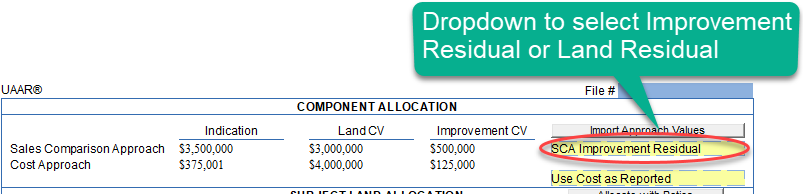
If Improvement Residual is selected (the other non-visible option), then the subtraction will work the other way (Indication - Improvement CV = Land CV
When the Import Values button is clicked we will import values (if a form with the context numbers exists, that will automatically get transferred to this form)
If Land Residual is selected then SalesComparisonApproach_Indication - SalesComparisonApproach_LandCV = SalesComparisonApproach_ImprovementCV
If Improvement Residual selected then SalesComparisonApproach_Indication - SalesComparisonApproach_ImprovementCV = SalesComparisonApproach_LandCV
Below shows the calculations based on if Improvement Residual or Land Residual is selected.
|
|
Indication (3) |
Land CV(4) |
Improvement CV(5) |
|
|
Sales Comparison Approach |
3,500,000 |
2,000,000 |
1,500,000 |
Improvement Residual |
|
|
Entered |
Entered
|
=#3-#4
|
|
|
|
|
|
|
|
|
Sales Comparison Approach |
3,500,000 |
2,000,000 |
1,500,000 |
Land Residual |
|
|
Entered |
#4 = #3 - #5
|
Entered
|
|
"Use Sales as Reported" combo in the Component Allocation (Top) area:
This combo actually affects both the Subject Land Allocation (SLA) and the Subject Improvement Allocation (SIA) sections. There are 5 options:
- Use Sales -- if this is selected, the numbers from the Sales CV columns in both SLA and SIA sections are automatically transferred to the $/Acre and Reported Value columns respectively.
- Use Cost --if this is selected, the numbers from the Cost CV columns in both SLA and SIA sections are automatically transferred to the $/Acre and Reported Value columns respectively.
- Use Allocation -- if this is selected, No numbers are changed unless the Allocate with Ratios button is Pressed.
- Manual -- Don't transfer or try to sync anything up between the lists. Appraisers can manually enter and use the Sum and Difference and modify them as needed.
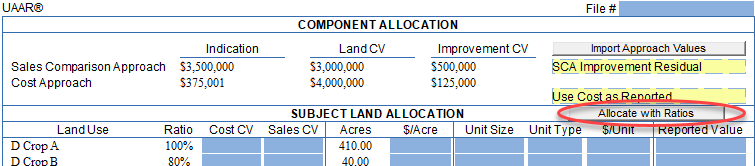
The "Allocate with Ratios" button under the Land Residual Combobox will allocate the $/Acre Value for the SLA Table based on the Use Sales/Use Cost drop down menu.
If Use Sales is selected then by pressing the Allocate with Ratios button will calculate the $/Acre Value based on the entered ratios and Allocating the Land CV Value from Sales Comparison Approach across the rows.
If Use Cost is selected then by pressing the Allocate with Ratios button will calculate the $/Acre Value based on the entered ratios and Allocating the Land CV Value from Cost Approach across the rows.
If Use Allocations is selected then by pressing the Allocate with Ratios button will calculate the $/Acre Value based on the entered ratios and Allocation the Land Contribution Reported Value from the Allocations area of the form (bottom).
Value from the Allocations area of the form (bottom).
SUBJECT LAND ALLOCATION (SLA)
The order that the math will be calculated for the Subject Land Allocation Area is as follows:
- If Unit Size and $/Unit are numeric than the Reported Value = Unit Size * $/Unit
- Otherwise the Acres * $/Acre will be entered into the Reported Value
- The sum of Reported Value is placed into the Sum column for Land Contribution in the Allocations area (bottom)
|
Land Use (11) |
Ratio(12) |
Cost CV(13) |
Sales CV(14) |
Acres(15) |
$/Acre(16) |
Unit Size(17) |
Unit Type(18) |
$/Unit(19) |
Reported Value(20) |
|
Crop |
100 |
8000 |
5 |
40 |
5 |
5000 |
SqFt |
100 |
500,000 |
|
|
|
|
|
|
|
17 |
|
18 |
=17*18 |
|
Pasture |
50 |
4000 |
16,000 |
160 |
16,000 |
1,000 |
SqFt |
|
|
|
|
|
|
|
|
|
17 |
|
18 |
=17*18 |
|
Use Sales as Reported |
|||||||||
|
Land Use (11) |
Ratio(12) |
Cost CV(13) |
Sales CV(14) |
Acres(15) |
$/Acre(16) |
Unit Size(17) |
Unit Type(18) |
$/Unit(19) |
Reported Value(20) |
|
Crop |
100 |
|
5 |
40 |
5 |
|
|
|
200 |
|
|
Entered |
|
Entered |
Entered |
=14 |
|
|
|
=15*16 |
|
Pasture |
50 |
|
4,000 |
160 |
4,000 |
|
|
|
640,000 |
|
|
Entered |
|
Entered |
Entered |
=14 |
|
|
|
=15*16 |
|
Use Cost as Reported |
|||||||||
|
Land Use (11) |
Ratio(12) |
Cost CV(13) |
Sales CV(14) |
Acres(15) |
$/Acre(16) |
Unit Size(17) |
Unit Type(18) |
$/Unit(19) |
Reported Value(20) |
|
Pature |
85 |
100,000 |
|
100 |
1,000 |
|
|
|
100,000 |
|
|
Entered |
Entered |
|
Entered |
=13/15 |
|
|
|
=15*16 |
|
Pasture |
85 |
|
45,000 |
100 |
450 |
|
|
|
|
|
|
Entered |
|
Entered |
|
=14/15 |
|
|
|
|
|
Pasture |
85 |
100,000 |
45,000 |
100 |
1,000 |
|
|
|
100,000 |
|
|
Entered |
Entered |
Entered |
|
=13/15 (because cost has value) |
|
|
|
=15*16 |
|
Use Allocate with Ratios |
|||||||||
|
Land Use (11) |
Ratio(12) |
Cost CV(13) |
Sales CV(14) |
Acres(15) |
$/Acre(16) |
Unit Size(17) |
Unit Type(18) |
$/Unit(19) |
Reported Value(20) |
|
Crop |
100 |
66,667 |
25,000 |
10040 |
33,333.33 (allocated from reported value in allocation) |
|
|
|
1,333,333 |
|
|
Entered |
Entered |
|
Entered |
Calculated |
|
|
|
=15*16 |
|
Pasture |
50 |
8,333 |
12,500 |
160 |
16,666.66 |
|
|
|
2,666,667 |
|
|
Entered |
|
Entered |
|
Calculated |
|
|
|
=15*16 |
|
Manual |
|||||||||
|
Land Use (11) |
Ratio(12) |
Cost CV(13) |
Sales CV(14) |
Acres(15) |
$/Acre(16) |
Unit Size(17) |
Unit Type(18) |
$/Unit(19) |
Reported Value(20) |
|
Pature |
85 |
100,000 |
|
100 |
1,000 |
|
|
|
100,000 |
|
|
Entered |
Entered |
|
|
=13/15 |
|
|
|
=15*16 |
|
Pasture |
85 |
|
45,000 |
100 |
450 |
|
|
|
45,000 |
|
|
Entered |
|
Entered |
|
=14/15 |
|
|
|
=15*16 |
|
Pasture |
85 |
100,000 |
45,000 |
100 |
1,000 |
|
|
|
100,000 |
|
|
Entered |
Entered |
Entered |
|
=13/15 (because cost has value) |
|
|
|
=15*16 |
Formula to calculate the $/Acre when Allocate with Ratios button is pressed:
- Use Allocations is selected: Row 1(Acres * $/Acre) + Row 2(Acres * $/Acre) + …. = Reported Land Contribution
- Use Sales is selected: Row 1(Acres * $/Acre) + Row 2(Acres * $/Acre) + … = Sales Comparison Approach Land CV value
- Use Cost is selected: Row 1(Acres * $/Acre) + Row 2(Acres * $/Acre) + … = Cost Approach Land CV value
Subject Improvement Allocation (SIA)
|
Dwelling (112) |
Improvement(113) |
Size(114) |
Unit(115) |
Utillity(116) |
Cond.(117) |
Eff. Age(118) |
REL(119) |
Cost CV(120) |
Sales CV(121) |
Reported Value (122) |
|
|
Barn |
5000 |
|
|
|
|
|
400,000 |
|
|
|
|
|
|
|
|
|
|
|
Entered |
|
|
|
X |
House |
3000 |
|
|
|
|
|
100,000 |
|
|
|
|
|
|
|
|
|
|
|
Entered |
|
|
If Allocate Proportional button is pressed:
1. First will look at which value is selected from the drop down menu above
a. Manual : Does not change any values
b. Use Allocations: Will use the values in Cost CV first then if not present will use Sales CV to determine ratio
i. Will then use that ratio to calculate the Reported Value using the Allocations Improvement Contribution Reported Value as the total that is allocated against.
c. Use Sales: Will use the values in Sales CV to determine ratio
i. Will then use that ratio to calculate the Reported Value using the Sales Comparison Approach Improvement CV Value as the total that is allocated against.
d. Use Cost: Will use the values in Cost CV to determine ratio
i. Will then use that ratio to calculate the Reported Value using the Cost Approach Improvement CV Value as the total that is allocated against.
If you have questions or need assistance, please don't hesitate to contact us.